







SZJLMKJ Original Gamerfinger Optical PCB Kit for Sanwa JLF Joysticks

 4.2 (65 items)
 Limited Time Sale
$35.98 cheaper than the new price!!
Free cash-on-delivery fees for purchases over $99
Product details
| Management number | 218718337 | Release Date | 2026/05/03 | List Price | $23.98 | Model Number | 218718337 | ||
|---|---|---|---|---|---|---|---|---|---|
| Category | |||||||||
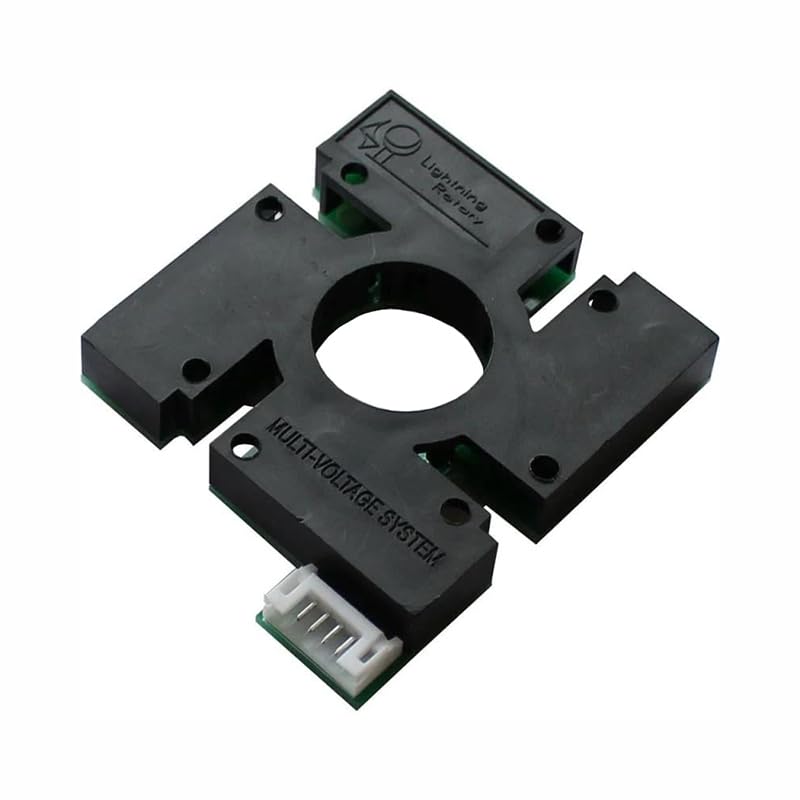
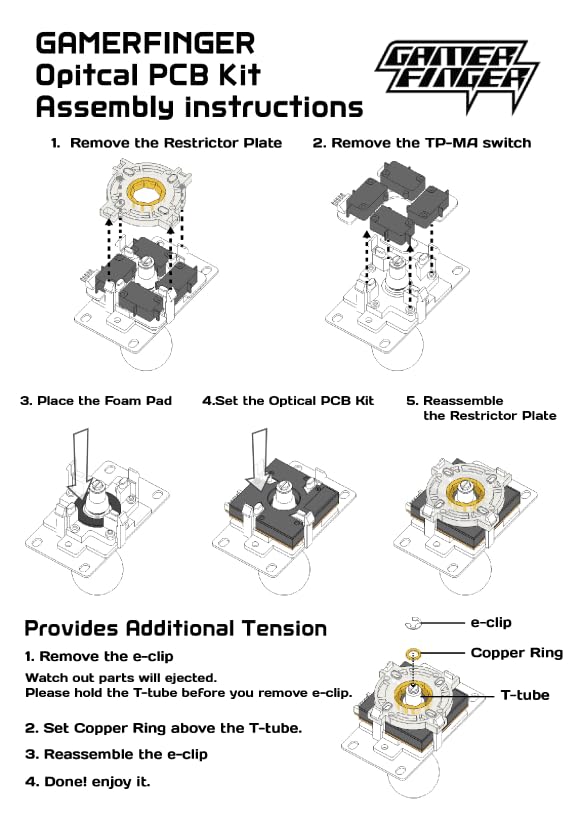
GamerFinger Optical Joystick PCB For Sanwa JLF Joystick For those desiring silent, long-lasting, incredibly precise digital control when playing, the GamerFinger Optical Joystick PCB For Sanwa JLF Joystick is an economical solution, great for those who already own this popular joystick lever. this generation's most ubiquitous multi-console control PCBS. To replace the original TP-MA PCB with the GamerFinger Optical PCB: 1.Remove the plastic square gate by pinching the tabs at each side of the gate inward. It's usually easiest to pinch two from one side, then pull that side up. 2. Remove the small metal "e-clip" located at the bottom of your joystick shaft. 3.Following that, remove the actuator (located just above the e-clip) and spring. The TP-MA PCB is a small circuit board with the joystick microswitches attached. 4.Remove the TPMA switch from the joystick body, then place the GamerFinger Optical PCB into it with the black cover facing out. 5. Attach the 6-pin harness included with the kit to the 6 pin connector on the GamerFinger Optical PCB. You can then either solder the signal and ground wire (black) to your joystick PCB's up, down, left and right ports, or connect the wires to the corresponding ports on a solderless PCB. 6.Solder the 5v harness wire (red) to the +5v USB port of the main joystick PCB. The joystick PCB's USB port is usually a red wire or specifically labeled on the PCB.
- For those desiring silent, long-lasting, incredibly precise digital control when playing, the GamerFinger Optical Joystick PCB For Sanwa JLF Joystick is an economical solution, great for those who already own this popular joystick lever.<br> This generation's most ubiquitous multi-console control PCBS.
- Kowal 1mm oversize actuator, or any larger actuator is not compatible with this product. Optical joysticks are optimized for the Sanwa GT-8F 4/8-Way Restrictor Plate, Sanwa GT Y Octagonal Restrictor Gate or JLF GT-Y Octagonal Restrictor Plate Insert. Gates such as the JLF GT-O Circle Restrictor Plate Insert limit its effectiveness.
- 1.Remove the plastic square gate by pinching the tabs at each side of the gate inward. It's usually easiest to pinch two from one side, then pull that side up.<br> 2. Remove the small metal "e-clip" located at the bottom of your joystick shaft.
- 3.Following that, remove the actuator (located just above the e-clip) and spring. The TP-MA PCB is a small circuit board with the joystick microswitches attached.<br> 4.Remove the TPMA switch from the joystick body, then place the GamerFinger Optical PCB into it with the black cover facing out.
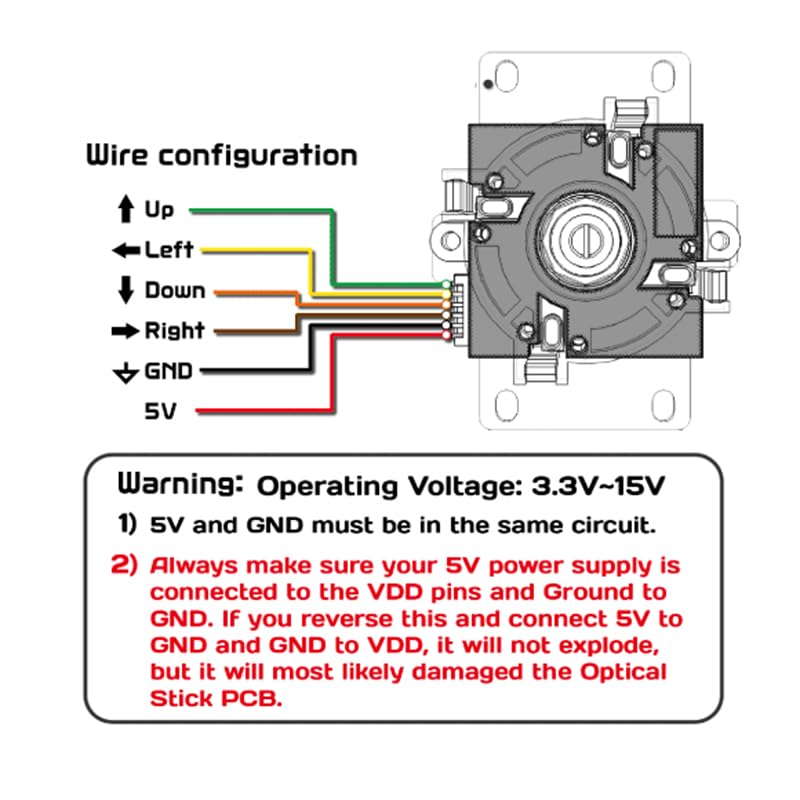
- 5. Attach the 6-pin harness included with the kit to the 6 pin connector on the GamerFinger Optical PCB. You can then either solder the signal and ground wire (black) to your joystick PCB's up, down, left and right ports, or connect the wires to the corresponding ports on a solderless PCB.<br> 6.Solder the 5v harness wire (red) to the +5v USB port of the main joystick PCB. The joystick PCB's USB port is usually a red wire or specifically labeled on the PCB.
| Color | Black |
|---|---|
| Brand Name | SZJLMKJ |
| Model Name | RM |
| Item Weight | 43 Grams |
| Manufacturer | SZJLMKJ |
| Button Quantity | 1 |
| Controller Type | Joystick |
| Package Quantity | 1 |
| Hardware Platform | PC |
| Compatible Devices | PC |
| Additional Features | Multiuse |
| Connectivity Technology | USB |
| Manufacturer Part Number | gfb01 |
| Compatible Video Game Console Models | Nintendo Wii, Sony PlayStation 5 |
Social Issues



Croissants


Correction of product information
If you notice any omissions or errors in the product information on this page, please use the correction request form below.
Correction Request Form