






Metal Plate Stamping Machine Manual Punch Marker Semi-Automatic Embossing Device Fast, Clear Marking for Asset Tags Serial Numbers Equipment Labels(3mm,Dot Matrix Font)

 4.2 (21 items)
 Limited Time Sale
$174.77 cheaper than the new price!!
Free cash-on-delivery fees for purchases over $99
Product details
| Management number | 220465063 | Release Date | 2026/05/03 | List Price | $116.51 | Model Number | 220465063 | ||
|---|---|---|---|---|---|---|---|---|---|
| Category | |||||||||
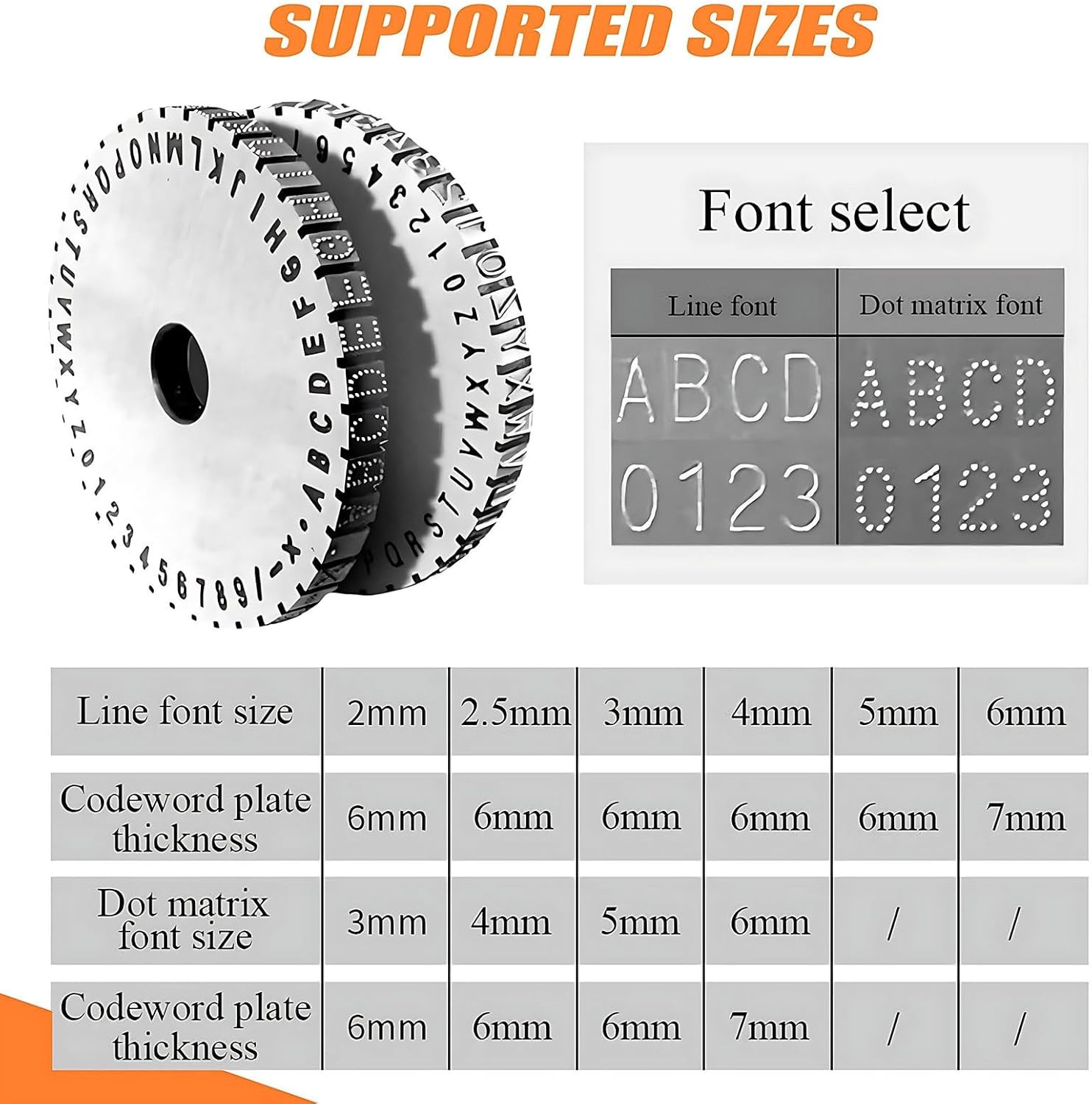
The metal nameplate stamping machine is a semi-automatic embossing tool that engraves deep, permanent markings (0.01–2mm) on stainless steel, copper, aluminum, PVC cards, dog tags, and industrial nameplates, Perfect for equipment labels, serial numbers, and manufacturing identification in workshops and factories.▶ Semi-Automatic use, Lever adjustment enables fast, accurate character spacing.▶ Aluminum body and hardened steel wheel ensure long-lasting use.▶ Adjustable Depth & Size, Engraves 0.01–2mm deep; character heights 2–6mm.▶ Replaceable Wheels, Dot matrix and uppercase wheels for flexible symbols and numbers.▶ Wide Material Use, Works on stainless steel, copper, aluminum, PVC, plastic, wood, and dog tags.▶ Perfect for equipment labels, asset tracking, serial numbers, and ID plates.▶ No Electricity Needed, Manual semi-automatic design reliable for workshops and factories.➤➤ SpecificationsProduct Name: Metal Sign PrinterFont adjustment: Semi-automaticNet Weight: 7.5kgGross Weight: 9kgMachine Dimensions: 320*280*270mmPackaging Dimensions: 370*340*310mmPlatform Dimensions: 200*135mmSupported Content: Uppercase letters (AZ), numbers (0-9), basic symbols × / -Applicable Materials: Copper, aluminum, stainless steel signs, PVC cards, etc.Supported Content: Uppercase letters, numbers, simple symbolsFont Height: 2 mm, 2.5 mm, 3 mm, 4 mm, 5 mm, 6 mm optionalFont Type: Line font, dot matrix fontMachine Material: Thickened aluminum alloy, chrome vanadium steel type wheels➤➤ Instructions for Use1. Label Placement: Place the label on the workbench as shown in the upper left corner of the image. The label and magnetic clips will prevent the pressure plate from loosening.2. Wheel Installation/Removal: First, use a wheel wrench to remove the wheel nuts. Select the correct wheel and align the wheel locking nut with the pointer.3. Printing and Starting Position Adjustment: After placing the label, disengage the clutch. Turn the handwheel to adjust the spacing and character spacing until the wheel aligns with the characters printed in the square position directly above the locking extension unit. Release the clutch lever. Under pressure, you will see the character spacing adjustment handle feed paper at the caliper spacing density (the handwheel has been correctly adjusted for character spacing). Press the clutch, turn the handwheel, and return the clutch lever to its original position. Tap the rubber part with your palm. After applying pressure to the paper feed handle, adjust the spacing to achieve printing.➤➤ Package List:1* Metal Sign Printer1* Character Nameplate1* Workpiece Fixture1* Spare Drive Belt1* Instruction Manual➤➤ 24-Hour Customer Service:If you have any questions, please feel spare to contact us. We are dedicated to serving you and will respond to your inquiries within 24 hours.
- 【Semi-automatic High Efficiency Marking】The metal nameplate stamping machine features semi-automatic lever spacing adjustment for fast and neat alignment. Adjustable depth spacing allows for engraving letters with a depth of 0.01-2mm, and a printing velocity of 6 characters/min, making it Perfect for equipment labels and production marking.
- 【Multi-functional Applications】The metal stamping machine is suitable for stainless steel, copper, aluminum, PVC, and plastic sheets, and is also suitable for dog tag stamping and ID tag marking.
- 【Comprehensive Character Support】The semi-automatic embossing machine is equipped with hardened character wheels and replaceable dot matrix embossing components. It supports letters, numbers, and symbols in sizes of 2 mm, 2.5 mm, 3 mm, 4 mm, 5 mm, and 6 mm.
- 【Rugged and Durable Industrial Construction】The metal nameplate engraving machine uses an aluminum alloy body and hardened steel wheels to ensure stable pressure and durability.
- 【Wide Range of Industrial Applications】The metal nameplate stamping machine can perform permanent marking without electricity, making it Perfect for making nameplates, pet tags, and industrial nameplates.
| Item Weight | 20.3 pounds |
|---|---|
| Manufacturer | PRECISTECH |
| Item model number | PRECISTECH |
| Product Dimensions | 0.12 x 13.39 x 12.2 inches |
Cocktail


CD-R


Correction of product information
If you notice any omissions or errors in the product information on this page, please use the correction request form below.
Correction Request Form